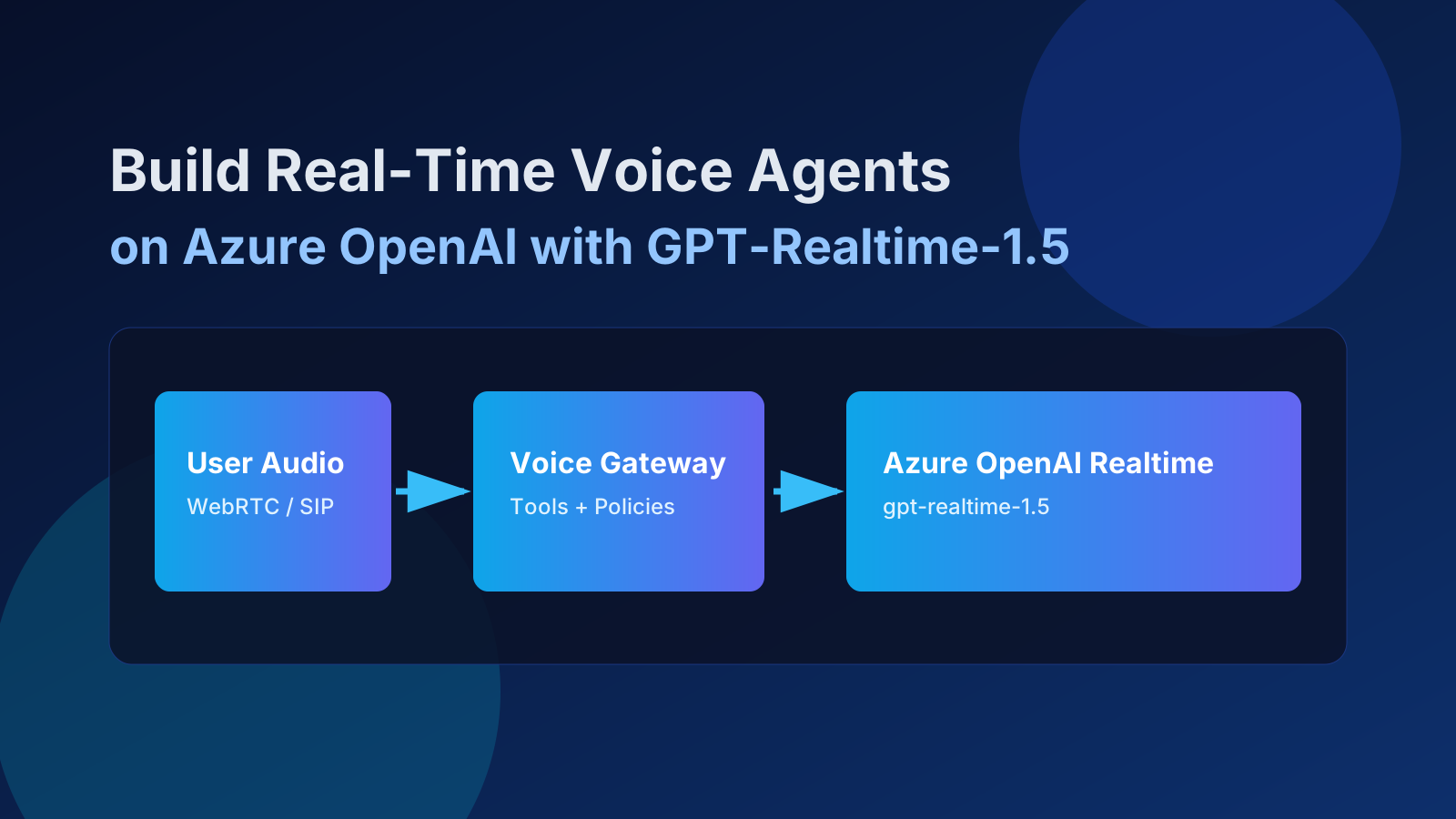
Build Real-Time Voice Agents on Azure OpenAI with GPT-Realtime-1.5
A practical implementation guide for production-grade voice agents on Azure OpenAI using GPT-Realtime-1.5, including architecture, latency, tooling, observability, and security.

Voice AI demos are easy. Production voice agents are not.
The gap is usually not model quality — it is architecture discipline: latency budgets, tool orchestration, observability, and security controls that survive enterprise traffic.
With Azure OpenAI + GPT-Realtime-1.5, you can now build low-latency, speech-in/speech-out assistants that are genuinely production-capable if you design for ops from day one.
In this guide I’ll show a practical build pattern I use for real-time voice agents on Azure, including Python and .NET implementation notes, framework-agnostic integration patterns, and hardening checklists.
Why GPT-Realtime-1.5 on Azure is interesting right now
- Azure now exposes modern realtime model deployments (including
gpt-realtime-1.5-2026-02-23) with managed enterprise controls. - You can choose the transport based on use case: WebRTC for client latency, WebSocket for server middleware, SIP for telephony paths.
- You keep billing, RBAC, networking, and compliance aligned with existing Azure governance.
For teams already on Azure, this is a big deal: you can ship conversational voice without introducing a parallel, hard-to-govern AI stack.
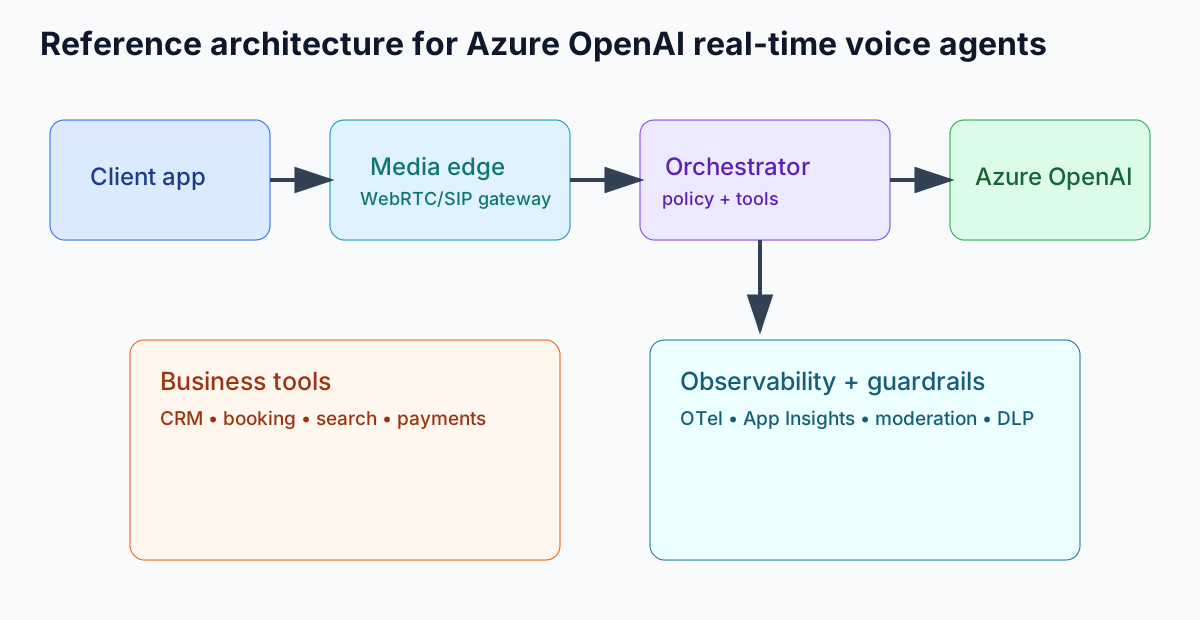
Reference architecture (framework-agnostic)
Think in four layers, regardless of framework or language:
- Client + media edge: browser/mobile/telephony endpoint capturing mic audio and streaming it over WebRTC/SIP/WebSocket.
- Session orchestrator: your control plane for session config, tool contracts, safety policies, and routing.
- Realtime model: Azure OpenAI realtime deployment handling turn-taking, transcription, reasoning, and speech output.
- Business systems: deterministic tool endpoints (CRM, booking, pricing, ticketing, internal search) behind strict timeout and auth policy.
Key design rule: keep the model conversational, keep tools deterministic, and keep policy outside prompt-only logic.
Transport selection quick guide
- WebRTC: best user-perceived latency for browser/mobile voice UX.
- WebSocket: best when your server mediates traffic (compliance logging, business policy injection, multi-tool orchestration).
- SIP: telephony and call-center integration where PSTN interoperability matters.
Latency engineering: the part most teams underestimate
Users judge a voice agent on interruption handling and time-to-first-audio, not benchmark scores. Budget latency by stage and enforce it in code.
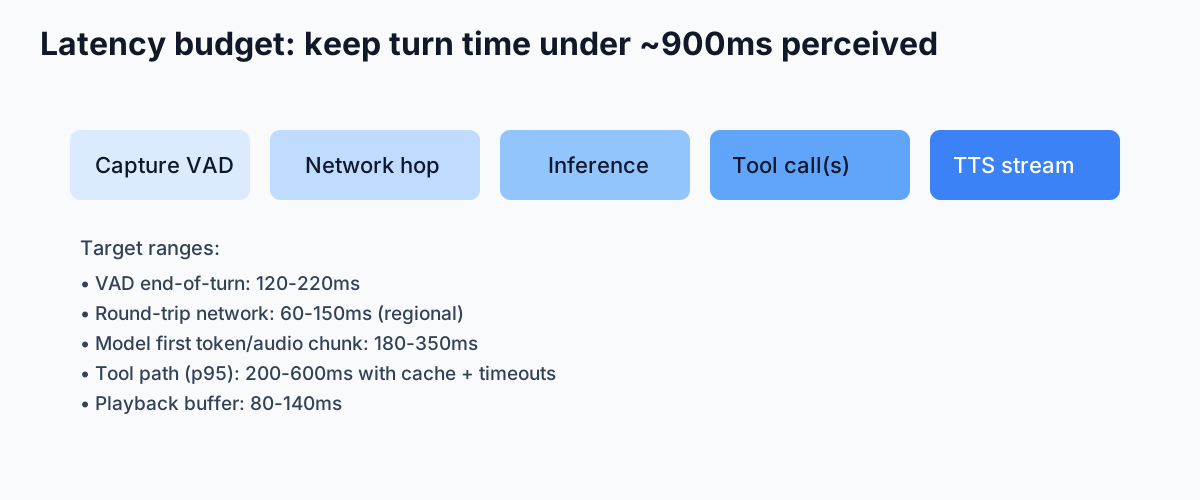
Practical latency targets
- End-of-speech detection (VAD): ~120-220ms
- Network RTT in-region: ~60-150ms
- Model first chunk: ~180-350ms
- Tool path p95: keep under 600ms where possible
- Playback buffer: ~80-140ms
If your tool chain regularly exceeds budget, don’t “wait longer.” Respond with partial conversational progress (“Let me check that now…”) and continue streaming while the tool resolves.
Tool-calling pattern that scales
- Model emits structured tool call.
- Orchestrator validates schema and authorization context.
- Tool executes with timeout + retry policy.
- Result is normalized and re-injected into conversation state.
- Model continues response with grounded data.
Never let the model call internal systems directly. Route through a policy-enforcing orchestration layer.
Python implementation notes (WebSocket orchestration path)
Python remains a strong choice for fast iteration and AI middleware control planes.
- Use
websockets+azure-identity(prefer Entra ID token flow in production). - Treat events as typed envelopes (
input_audio_buffer.append,response.create, tool events, cancel events). - Implement backpressure controls for audio frame ingestion; never let queue depth grow unbounded.
- Keep per-session state minimal and externalize long-running memory to a state store.
# Python pseudo-flow
# 1) receive pcm frame -> append
# 2) commit on VAD end
# 3) response.create with tool schema
# 4) intercept tool call, execute server-side
# 5) send tool result item, continue response stream

async for event in ws:
    if event.type == "response.function_call_arguments.done":
        result = await execute_tool(event)
        await ws.send(tool_result_item(result))
        await ws.send({"type": "response.create"})
For production Python services, run UVLoop-compatible servers and isolate CPU-heavy audio transforms into worker pools.
.NET implementation notes (enterprise service path)
.NET is often the better fit when the voice agent lives inside an enterprise platform with strong observability and policy requirements.
- Use
ClientWebSocketor ASP.NET Core hosted services for session orchestration. - Use
DefaultAzureCredentialfor managed identity in Azure-hosted workloads. - Model tool definitions as strongly typed contracts and validate with FluentValidation or equivalent.
- Use cancellation tokens aggressively on every external call in the tool chain.
// .NET pseudo-flow
await socket.SendAsync(SessionUpdate(toolSchemas, safetyPolicy));
await socket.SendAsync(InputAudioBufferAppend(frame));
await socket.SendAsync(InputAudioBufferCommit());
await socket.SendAsync(ResponseCreate());

if (evt.Type == "response.function_call_arguments.done")
{
    var toolResult = await _toolRunner.RunAsync(evt, cancellationToken);
    await socket.SendAsync(ConversationItemCreate(toolResult));
    await socket.SendAsync(ResponseCreate());
}
Use ASP.NET rate-limiting middleware at tenant and user levels to avoid noisy-neighbor behavior in shared deployments.
Observability: trace every turn, not just errors
For real-time voice, logs are insufficient. You need correlated traces and metrics per conversation turn:
- Turn timeline: VAD end, model start, first audio chunk, tool call start/end, playback complete.
- Quality: interruption rate, abandoned turns, user barge-in count, tool success rate.
- Latency SLOs: p50/p95 first-byte audio, tool round-trip, end-to-end turn time.
- Cost telemetry: token + audio-minute attribution by tenant/feature.
OpenTelemetry + Azure Monitor Application Insights is a practical default. Instrument each tool invocation as a child span of the turn trace and propagate correlation IDs across media, orchestration, and business APIs.
Security, privacy, and compliance posture
Voice workloads amplify risk because audio often contains PII and sensitive context. Your baseline should include:
- Microsoft Entra ID / managed identity over static keys where possible.
- RBAC scoped by environment and least-privilege service principals.
- Private networking strategy (private endpoints/VNet integration) where required by policy.
- PII minimization: redact or hash sensitive entities before long-term storage.
- Explicit retention windows for transcripts and call metadata.
- Content safety and policy filters at both prompt and tool-result boundaries.
Azure’s data privacy model for Azure Direct Models is a strong enterprise baseline, but you still own application-level controls: consent, retention, user rights workflows, and auditability.
Cost and performance checklist
- Choose model tier by use case: route simpler intents to lower-cost realtime variants when acceptable.
- Trim prompt/context aggressively; carry forward summaries instead of full transcript replay.
- Cache deterministic tool responses (availability, catalog data, policy docs) with short TTLs.
- Bound tool fan-out; parallelize only when it beats sequential latency in practice.
- Use dynamic session policies (e.g., switch voice quality tier after prolonged calls if budget-sensitive).
- Alert on cost-per-successful-conversation, not raw token volume alone.
Production readiness checklist
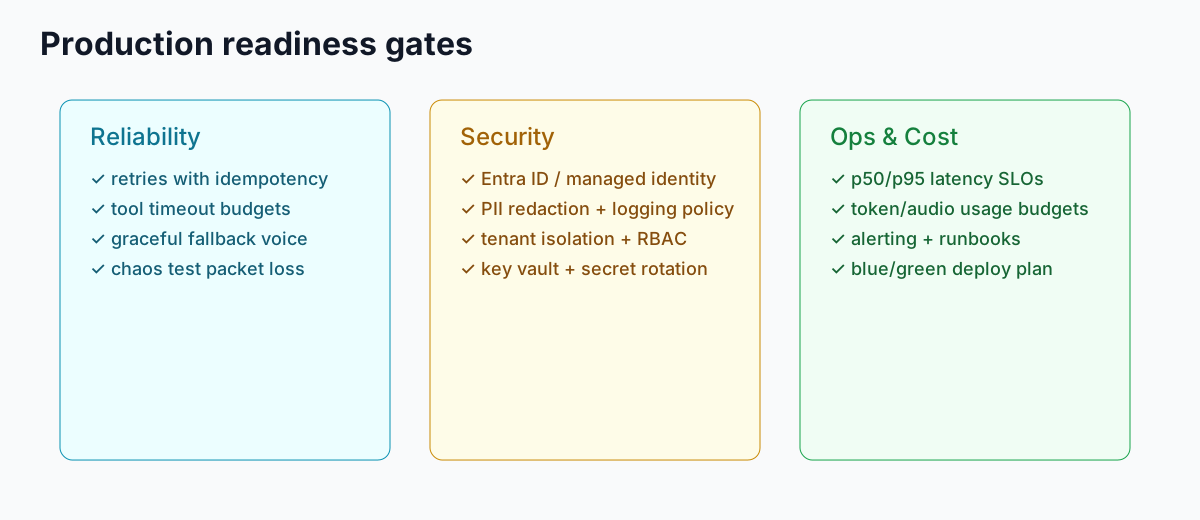
- Reliability: retries, idempotent tool handlers, fallback response behavior, chaos testing with packet loss.
- Safety: prompt-injection defenses for tool outputs, moderation in/out, jailbreak regression suite.
- Operational: runbooks for degraded regions, blue/green deployment strategy, synthetic conversation probes.
- Governance: per-tenant usage quotas, audit logs, incident response hooks, DSR/retention automation.
- UX: interruption behavior tuning, confirmation patterns for high-risk actions, human handoff path.
Common failure modes (and how to avoid them)
- Overstuffed system prompts: teams place policy, routing, compliance text, and tool schemas into one giant prompt. Split concerns: static policy at session config, tool contracts in code, short behavioral instructions in prompt.
- No timeout hierarchy: if tool timeouts exceed turn timeout, users hear silence. Define strict nested budgets (turn timeout > orchestration timeout > tool timeout > downstream timeout).
- Missing interruption policy: users will barge in. Define when to cancel model output, when to keep partial state, and how to acknowledge interruption naturally.
- Metrics without thresholds: dashboards are useless without SLOs. Set explicit p95 limits and page on sustained violations.
- Blind trust in tool output: treat every tool response as untrusted input; sanitize, validate schema, and strip prompt-like text before reinjection.
Final implementation advice
If you take one thing from this guide, make it this: design your voice agent as a real-time distributed system, not a chat demo with a microphone.
GPT-Realtime-1.5 on Azure gives you the model primitives. The production win comes from orchestration discipline, measurable latency budgets, and policy-first tooling.
Start narrow (one high-value workflow), instrument everything, then expand to broader conversational coverage once your p95 latency and guardrail metrics are stable.
References